Podcast Chapters and M4A support
We’ve just launched one of the biggest updates to the Pinecast in a while. This new update has a lot in it, and it should make your experience with Pinecast a bit better.
Podcast chapters
Section titled “Podcast chapters”We now fully support podcast chapters. If you upload an audio file with chapters in the metadata, we’ll read them out and apply them to your episode. You can edit them in the brand new “Chapters and clip placeholders” editor:
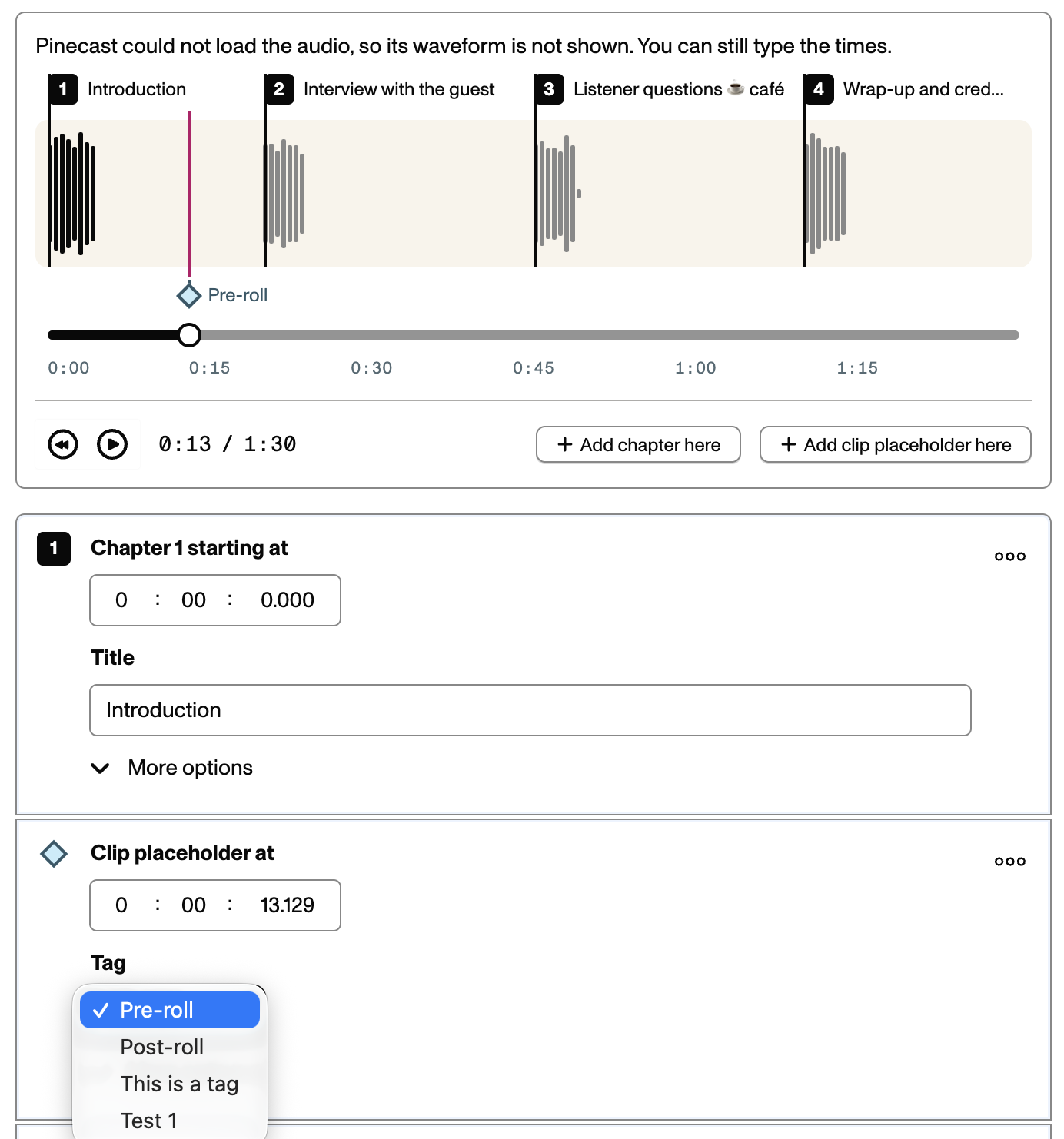
This UI replaces the existing clip placeholders field. We now show a GUI that allows you to seek through your episode to add clip placeholders and chapters on the waveform timeline. Chapters that were in your audio’s metadata are pre-loaded into the editor.
Getting chapters
Section titled “Getting chapters”We make chapters available across your podcast:
- Your RSS and JSON feeds will link to a Podcasting 2.0-compatible chapter manifest. This is read by apps like Apple Podcasts.
- You can include chapters automatically in your show notes. Under your podcast Settings tab, visit the Episode formatting view. By default, chapters are not added to show notes. You can add them to the end or the beginning of your show notes.
- There’s a new chapters page element available for podcast websites. All of our presets include the ability to show podcast chapters when someone visits the page for an episode.
- We write chapters into your audio file metadata, so even folks who download the audio file will see them.
- Update your WordPress Sync plugin to 2.3.0 to pull chapters in to your WordPress website.
More chapters integrations are coming soon.
M4A support
Section titled “M4A support”Historically, we’ve supported reading and writing metadata for MP3 files (via ID3 tags). Now, we also support the same features for M4A. We’ll include:
- Episode metadata (title, podcast name, etc.)
- Episode artwork, if set
- Chapters (as
chpltags)
If you already use AAC or M4A audio files, you don’t need to change your workflow: keep using Pinecast as you always have and your files will benefit immediately.
As always, we do not re-encode your audio files.
Drafts
Section titled “Drafts”Episode drafts now store your clip placeholders and chapters. Previously, clip placeholders were not saved in drafts.