Transcript improvements
We’re releasing a host of updates to our transcript feature set today.
Apple Podcasts support
Section titled “Apple Podcasts support”You may have heard that Apple is beginning to include transcripts in Apple Podcasts. Our latest updates enable full support for Apple’s transcript functionality for your show. If you’ve transcribed your episodes already, your feed already includes the appropriate tags.
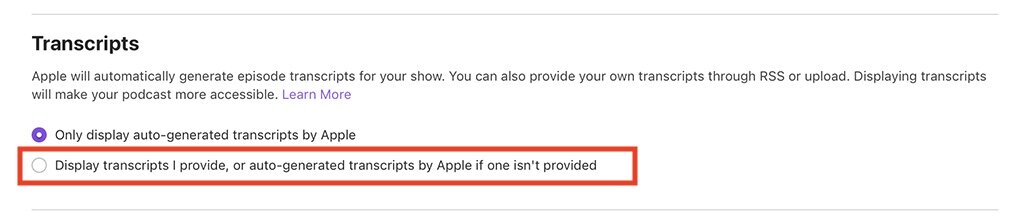
To use Pinecast transcripts instead of Apple transcripts, you’ll want to adjust the transcript setting in Apple Podcasts Connect:
Expanded VTT support
Section titled “Expanded VTT support”We’re making two exciting changes to our VTT file (transcript file) support:
-
VTT transcripts now include speaker identities. If you set the names of speakers in your episode by visiting the Transcript tab in your episode dashboard, we’ll add voice annotations (
<v>tags) to utterances that have a speaker name set. -
VTT files can now be downloaded if you’ve edited the transcript. Previously, VTT files were only available for unedited transcripts.
The latter update is especially exciting. When we transcribe episodes, we have a huge amount of information, including the time codes of each spoken word. When you modify the text, we don’t have high-fidelity data for the timestamps that the newly edited text is saved at.
Our systems will now use a series of intelligent heuristics to match words in your original transcript with words in the edited transcript. We’ll automatically upgrade the new data to include estimated time codes for each word that you provide and preserve the existing data.
This additionally means that we’re able to split long runs of spoken text into smaller lines (about 3.5-4.5 seconds) with accurate time codes, which we provide to our embedded players for captioning. If you’ve edited transcripts on Pinecast, players with themes that show transcripts will now automatically begin showing captions.
As we improve this technology, the accuracy of the calculated time codes will improve automatically, even for episodes transcribed in the past. We can look at the changes you’ve made and re-match words as our models improve.
Feed support
Section titled “Feed support”RSS feeds (public and subscriber-only) now include the <podcast:transcript> tag with URLs for VTT transcripts. Non-private episodes will include an equivalent link to transcripts which can be opened in the browser.
JSON Feeds now include additional attachments for VTT and plaintext transcripts (with appropriate MIME types).
Plaintext transcripts
Section titled “Plaintext transcripts”Plaintext (non-VTT) transcripts now include speaker names when they’ve been set on the Transcript tab of an episode dashboard.